Brand Brain
Overview
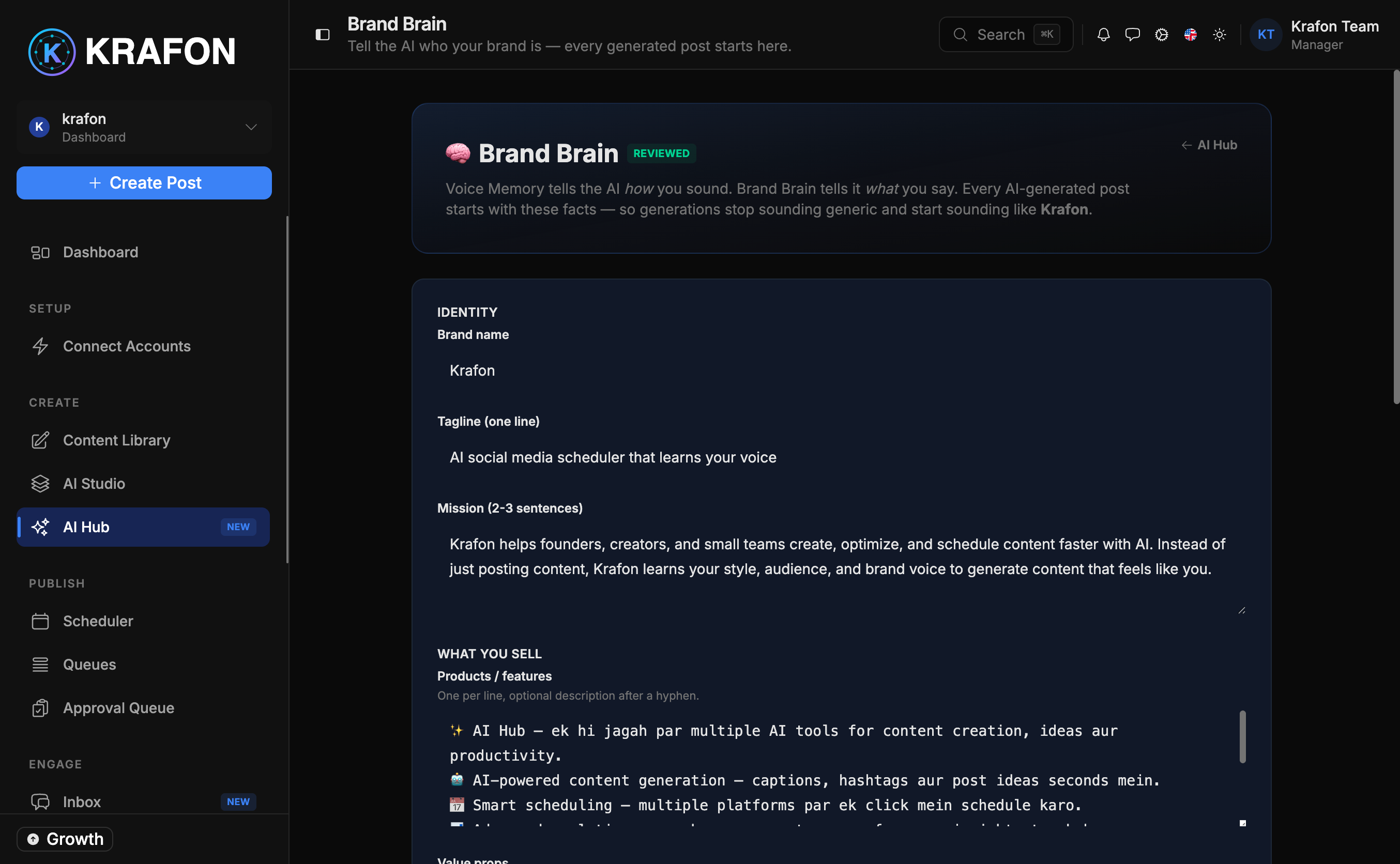
Brand Brain is where you teach Krafon's AI about your business: who you are, who you're talking to, and how you sound. It's the single source of truth that every other AI feature reads from. Browse and review it at /<workspace>/ai/brand-brain, and edit the inputs in settings at /<workspace>/settings/brand-voice.
Once trained, your Brand Brain ensures that AI Studio drafts, Autopilot posts, Trend Radar matches, and Post Doctor critiques all sound like you and stay on-message.
Why use this?
- Consistency everywhere. Every AI feature pulls from the same context, so your posts stay on-brand no matter which tool created them.
- Better first drafts. The AI starts with your real audience, tone, and offers instead of guessing.
- Less editing. When the AI already knows your voice and CTAs, you spend less time fixing drafts.
- It powers the rest. Many AI layers in the AI Hub won't activate until your Brand Brain is trained.
Train your Brand Brain first. It's the foundation for AI Studio, Autopilot, Trend Radar, Post Doctor, and more. Skipping it means weaker, more generic AI output everywhere.
How it works
- Open Settings → Brand Voice at
/<workspace>/settings/brand-voice. - Fill in your brand inputs (see the next section).
- Save your changes. Krafon trains the Brand Brain from what you provide.
- Open
/<workspace>/ai/brand-brainto review the trained profile and confirm it captured your brand correctly. - As your business evolves, return to settings to update the inputs and retrain.
What you provide
| Input | What to enter |
|---|---|
| Company / brand name | The name your audience knows you by. |
| Website & social URLs | Your site plus your social profiles so the AI has reference points. |
| Industry / niche | The space you operate in (e.g. fitness coaching, SaaS, fashion retail). |
| Target-audience description | Who you're speaking to — their goals, problems, and language. |
| Tone / voice keywords | A few words that describe your voice (e.g. professional, witty, educational). |
| Brand values | What your brand stands for. |
| Product / service description | What you sell and the outcomes it delivers. |
What it powers
Once trained, the Brand Brain feeds context into:
- AI Studio — on-brand drafts when you create content.
- Autopilot — daily drafts written in your voice.
- Trend Radar — trends matched to your niche, turned into on-brand drafts.
- Post Doctor — critiques and revisions aligned to your tone and CTAs.
Example workflow
- You open Settings → Brand Voice and enter your brand name, website, niche ("vegan meal-prep for busy professionals"), audience, and tone keywords ("warm, practical, no-nonsense").
- You describe your product (weekly meal-plan subscription) and your main CTA ("Start your first week free").
- You save, then open
/<workspace>/ai/brand-brainto confirm the profile reads correctly. - You head to Autopilot and notice the drafts now sound warm and practical and end with your real CTA.
Tips and notes
Use specific, vivid tone keywords. "Witty, contrarian, gym-bro energy" produces sharper output than "friendly."
Include your real CTAs in the product/service description. The AI will weave them into drafts so you don't have to add them every time.
Update your Brand Brain whenever you launch a new product, shift positioning, or change your tone. Retraining keeps every AI feature current.
Common issues
Problem: AI drafts don't sound like your brand.
Solution: Revisit Settings → Brand Voice and add richer tone keywords, a clearer audience description, and concrete product details. Save and review the profile at /<workspace>/ai/brand-brain.
Problem: Other AI features are inactive or weak. Solution: They likely depend on a trained Brand Brain. Complete and save all the inputs above, then check the AI Hub to confirm the layers activate.
Problem: Your CTAs aren't appearing in posts. Solution: Add them explicitly to the product/service description and brand values fields, then retrain.
FAQ
Do I have to fill in every field? The more you provide, the better the output. At minimum, give your brand name, niche, audience, and tone keywords.
Where do I edit versus review?
Edit the inputs at /<workspace>/settings/brand-voice; review the trained profile at /<workspace>/ai/brand-brain.
Will updating my Brand Brain change existing drafts? It affects new AI output. Regenerate existing drafts to apply the updated voice.