Unified Inbox
The Inbox is a new Krafon feature. Comment sync currently centers on Meta platforms (Facebook and Instagram), with more platforms rolling out over time.
The Inbox lives at /<workspace>/inbox and brings every comment, mention, and direct message from your connected accounts into one place. Instead of jumping between apps and tabs, you read and reply to your whole audience from a single, combined thread view.
Overview
The Inbox pulls conversations from your connected platforms into one stream. Each item shows a platform badge so you always know where it came from, a sentiment indicator so you can triage tone at a glance, and inline reply tools so you can respond without leaving Krafon.
You can act on comments directly — reply, like, hide, or delete — and keep your queue tidy with statuses like Open, Closed, and Snoozed.
Why use this?
- One queue, every platform. Stop checking five apps. Comments, mentions, and DMs land in the same place.
- Faster replies. AI-assisted suggestions help you draft a response in seconds, in your own voice.
- Triage at a glance. Sentiment indicators and status filters let you handle the urgent stuff first.
- Stay in control. You approve every reply, and you can hide, like, or delete comments right from the thread.
- Fewer missed conversations. Snooze items to revisit later instead of losing them in a notification feed.
How it works
- Connect your accounts. The Inbox needs at least one connected platform to sync conversations. See Connecting Accounts. Comment sync currently focuses on Facebook and Instagram.
- Open the Inbox. Go to
/<workspace>/inbox. New comments, mentions, and DMs appear in the combined thread view, each tagged with a platform badge. - Filter your queue. Narrow the list by platform and by status — Open, Closed, or Snoozed — and by read / unread state to focus on what needs attention.
- Read the thread. Select a conversation to see the full thread, including the sentiment indicator for the incoming message.
- Reply directly. Type your response in the reply box, or use an AI-assisted reply suggestion as a starting point and edit it before sending.
- Act on the comment. Use the inline actions to like, hide, or delete a comment, or archive it / mark it as spam to clear it from your queue.
- Set a status. Mark a conversation Closed when it's handled, or Snooze it to bring it back later.
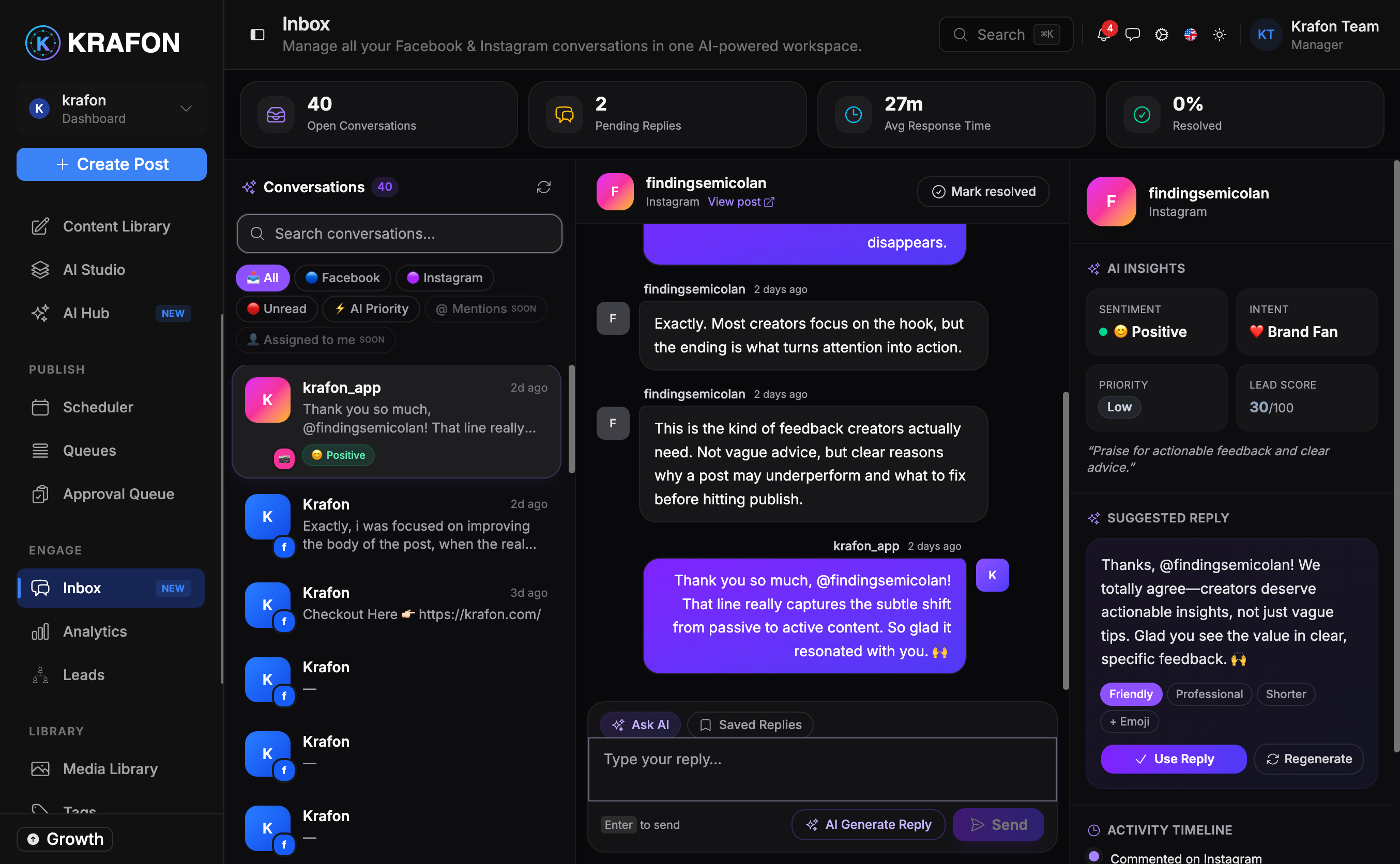
Example workflow
You post a new Instagram Reel and a Facebook update in the morning. By midday:
- You open the Inbox and filter to Open + Unread.
- A handful of positive comments come in — you tap the AI reply suggestion, tweak a word or two, and send.
- One comment looks like spam. You hide it, then mark it as spam.
- A potential customer asks about pricing. You reply, then Snooze the thread until you've sent them more details.
- Everything else is answered, so you mark those threads Closed and your queue is clean.
Lean on AI suggestions for routine replies, then spend your saved time on the conversations that matter — like leads and detailed questions. See how comments turn into prospects in Leads.
Sentiment indicators are a quick triage signal, not a precise judgment. Always read the message before acting on a negative-sentiment flag.
Delete is permanent. Deleting a comment removes it from the platform and can't be undone. If you only want it off your queue, hide or archive it instead.
Common issues
Problem: No conversations appear in the Inbox. Solution: Confirm you have at least one connected account and that it's a supported platform. Comment sync currently centers on Facebook and Instagram. Reconnect from Connecting Accounts if a connection has expired.
Problem: A reply failed to send. Solution: This usually means the platform connection lapsed or the original comment was deleted on the platform. Reconnect the account and try again; if the comment no longer exists, the thread may show as closed.
Problem: I don't see DMs or mentions from a platform I connected. Solution: Sync coverage varies by platform and is expanding. Meta platforms (Facebook and Instagram) are the current focus for comment sync. Other platforms may surface a subset of conversations.
FAQ
Do I have to approve every reply? Yes. Krafon never sends a reply on your behalf — you review and send each one, including AI-suggested drafts.
What's the difference between Closed and Snoozed? Closed means handled and out of your active queue. Snoozed temporarily hides a thread so it returns later for follow-up.
Can I see how my replies affect engagement? Engagement, reach, and sentiment trends live in Analytics.
Does hiding a comment notify the person? No. Hiding removes the comment from public view without alerting the commenter. Deleting removes it entirely.