Autopilot
Overview
Autopilot generates fresh post drafts in your brand voice every night, so you always have content waiting for you. Each morning you review the batch and approve, regenerate, or skip each draft. Approved drafts flow straight into your Scheduler.
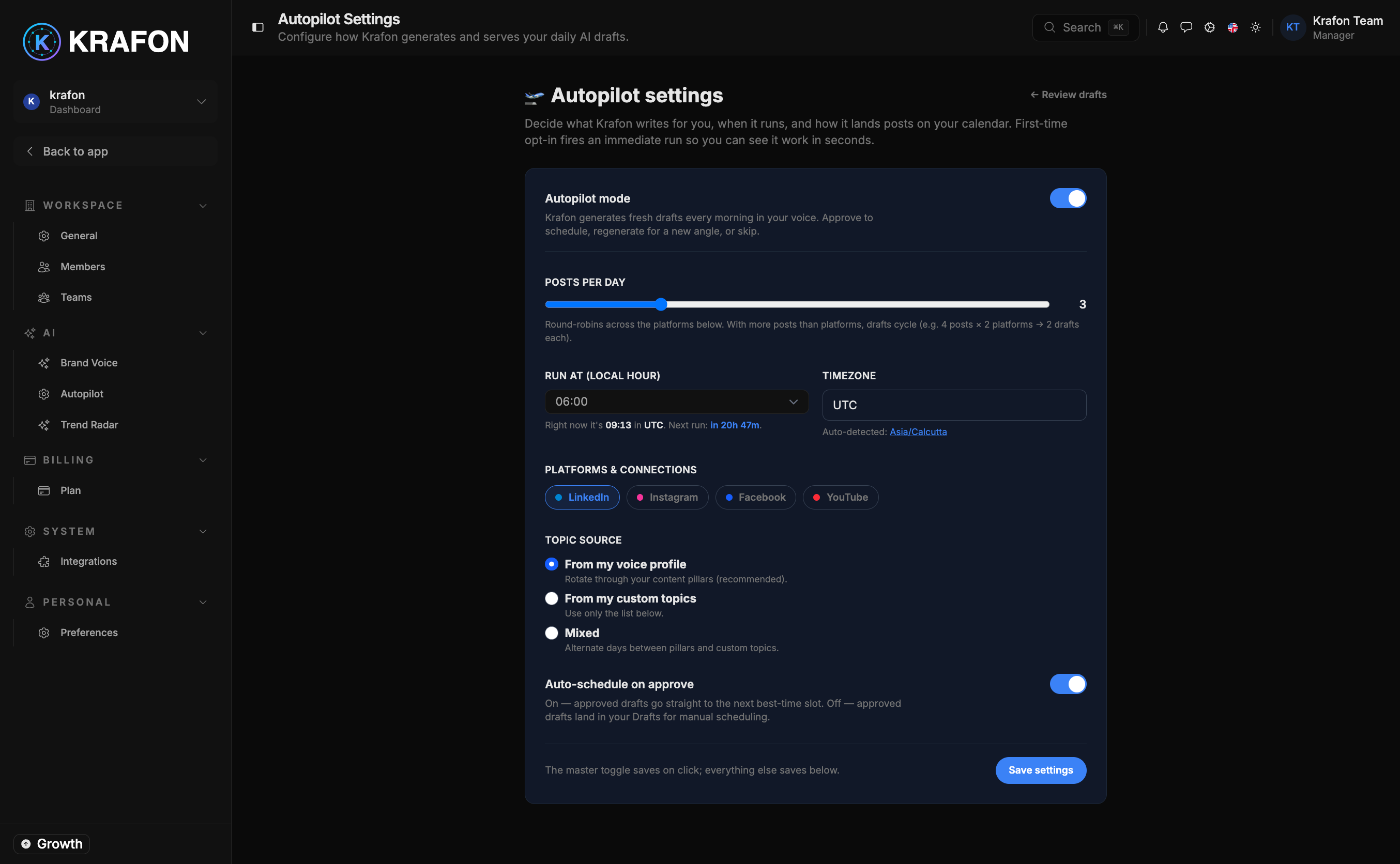
Review tonight's batch at /<workspace>/ai/autopilot, and configure how Autopilot behaves at /<workspace>/settings/autopilot.
Why use this?
- Never start from a blank page. Wake up to ready-to-review drafts written in your voice.
- Stay in control. Nothing publishes automatically — you approve every post before it moves forward.
- Keep a steady rhythm. Daily drafts make consistent posting effortless.
- Tune it to your style. Set how many drafts, when, where, and in what style.
How it works
- Make sure you have a trained Brand Brain and at least one connected account.
- Open Settings → Autopilot at
/<workspace>/settings/autopilotand turn Autopilot on. - Configure your preferences (see below) and save.
- Each night, Krafon generates the number of drafts you chose, written in your voice.
- The next day, open
/<workspace>/ai/autopilotto review the batch. - For each draft, choose:
- Approve — send it to the Scheduler.
- Regenerate — get a fresh take on the same idea.
- Skip — discard it for now.
- Approved drafts appear in the Scheduler, where you can set or adjust their timing.
Settings
| Setting | What it controls |
|---|---|
| Enable / disable | Turns nightly draft generation on or off. |
| Drafts per day | How many drafts Autopilot creates each night. |
| Posting time | The default time Autopilot targets for approved posts. |
| Target platforms | Which connected platforms drafts are written for. |
| Content style | The kind of content to lean toward (e.g. tips, stories, promos). |
Autopilot requires a trained Brand Brain and a connected account. Without them, drafts will be generic or won't generate at all.
Example workflow
- You set drafts per day to 2, posting time to 9:00 AM, target Instagram and LinkedIn, and content style to "educational tips."
- Overnight, Krafon writes two drafts in your voice.
- In the morning you open
/<workspace>/ai/autopilot: you approve the first, regenerate the second (the new version is sharper), then approve it too. - Both approved drafts land in your Scheduler near 9:00 AM, where you nudge one to the afternoon.
Tips and notes
Review drafts at the same time each day — it turns content into a five-minute habit instead of a project.
If a draft is close but not quite right, Regenerate is often faster than rewriting it yourself.
Approving a draft moves it to the Scheduler but doesn't necessarily lock its time. Confirm the schedule in the Scheduler, especially around per-day post limits on your plan.
Common issues
Problem: No drafts appear in the morning. Solution: Confirm Autopilot is enabled in Settings → Autopilot, that your Brand Brain is trained, and that a target platform is connected.
Problem: Drafts don't match your voice. Solution: Strengthen your Brand Brain with clearer tone keywords and audience details, then regenerate.
Problem: Approved drafts aren't publishing. Solution: Approval sends drafts to the Scheduler; they publish at their scheduled time. Open the Scheduler to confirm each post has a valid time and an active platform connection.
FAQ
Does Autopilot post on its own? No. It only drafts. You approve each one, and approved posts publish through the Scheduler at their scheduled time.
Can I edit a draft before approving? Yes. Adjust the copy in the review screen, then approve.
What happens to skipped drafts? They're discarded from that batch. New drafts arrive the next night.